
4.4 弹性布局(Flex)
弹性布局允许子组件按照一定比例来分配父容器空间。弹性布局的概念在其它UI系统中也都存在,如 H5 中的弹性盒子布局,Android中 的FlexboxLayout等。Flutter 中的弹性布局主要通过Flex和Expanded来配合实现。
Flex
Flex组件可以沿着水平或垂直方向排列子组件,如果你知道主轴方向,使用Row或Column会方便一些,**因为Row和Column都继承自Flex,**参数基本相同,所以能使用Flex的地方基本上都可以使用Row或Column。Flex本身功能是很强大的,它也可以和Expanded组件配合实现弹性布局。接下来我们只讨论Flex和弹性布局相关的属性(其它属性已经在介绍Row和Column时介绍过了)。
1Flex({
2  ...
3  required this.direction, //弹性布局的方向, Row默认为水平方向,Column默认为垂直方向
4  List<Widget> children = const <Widget>[],
5})Flex继承自MultiChildRenderObjectWidget,对应的RenderObject为RenderFlex,RenderFlex中实现了其布局算法。
Expanded
Expanded 只能作为 Flex 的孩子(否则会报错),它可以按比例“扩伸”Flex子组件所占用的空间。因为 Row和Column 继都承自Flex,所以 Expanded 也可以作为它们的孩子。
1const Expanded({
2  int flex = 1,
3  required Widget child,
4})flex参数为弹性系数,如果为 0 或null,则child是没有弹性的,即不会被扩伸占用的空间。如果大于0,所有的Expanded按照其 flex 的比例来分割主轴的全部空闲空间。下面我们看一个例子:
1class FlexLayoutTestRoute extends StatelessWidget {
2
3 Widget build(BuildContext context) {
4 return Column(
5 children: <Widget>[
6 //Flex的两个子widget按1:2来占据水平空间
7 Flex(
8 direction: Axis.horizontal,
9 children: <Widget>[
10 Expanded(
11 flex: 1,
12 child: Container(
13 height: 30.0,
14 color: Colors.red,
15 ),
16 ),
17 Expanded(
18 flex: 2,
19 child: Container(
20 height: 30.0,
21 color: Colors.green,
22 ),
23 ),
24 ],
25 ),
26 Padding(
27 padding: const EdgeInsets.only(top: 20.0),
28 child: SizedBox(
29 height: 100.0,
30 //Flex的三个子widget,在垂直方向按2:1:1来占用100像素的空间
31 child: Flex(
32 direction: Axis.vertical,
33 children: <Widget>[
34 Expanded(
35 flex: 2,
36 child: Container(
37 height: 30.0,
38 color: Colors.red,
39 ),
40 ),
41 Spacer(
42 flex: 1,
43 ),
44 Expanded(
45 flex: 1,
46 child: Container(
47 height: 30.0,
48 color: Colors.green,
49 ),
50 ),
51 ],
52 ),
53 ),
54 ),
55 ],
56 );
57 }
58}运行效果如图4-5所示:
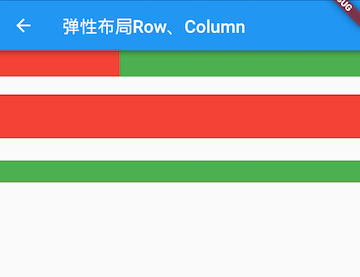
示例中的Spacer的功能是占用指定比例的空间,实际上它只是Expanded的一个包装类,Spacer的源码如下:
1class Spacer extends StatelessWidget {
2 const Spacer({Key? key, this.flex = 1})
3 : assert(flex != null),
4 assert(flex > 0),
5 super(key: key);
6
7 final int flex;
8
9
10 Widget build(BuildContext context) {
11 return Expanded(
12 flex: flex,
13 child: const SizedBox.shrink(),
14 );
15 }
16}小结
弹性布局比较简单,唯一需要注意的就是Row、Column以及Flex的关系。