
6.5 AnimatedList
AnimatedList 和 ListView 的功能大体相似,不同的是, AnimatedList 可以在列表中插入或删除节点时执行一个动画,在需要添加或删除列表项的场景中会提高用户体验。
AnimatedList 是一个 StatefulWidget,它对应的 State 类型为 AnimatedListState,添加和删除元素的方法位于 AnimatedListState 中:
1void insertItem(int index, { Duration duration = _kDuration });
2
3void removeItem(int index, AnimatedListRemovedItemBuilder builder, { Duration duration = _kDuration }) ;
下面我们看一个示例:实现下面这样的一个列表,点击底部 + 按钮时向列表追加一个列表项;点击每个列表项后面的删除按钮时,删除该列表项,添加和删除时分别执行指定的动画。
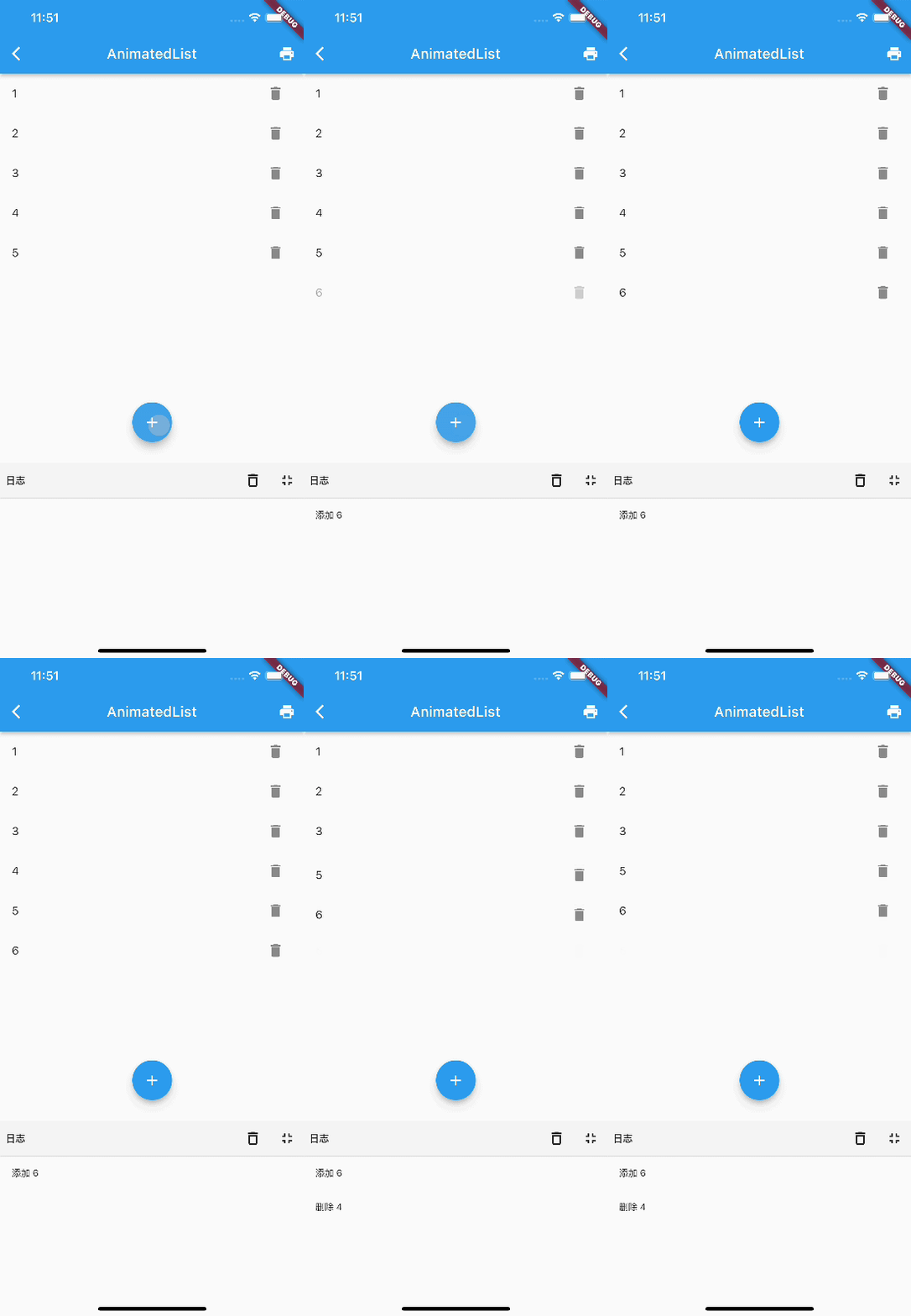
初始的时候有5个列表项,先点击了 + 号按钮,会添加一个 6,添加过程执行渐显动画。然后点击了 4 后面的删除按钮,删除的时候执行了一个渐隐+收缩的合成动画。
下面是实现代码:
1class AnimatedListRoute extends StatefulWidget {
2 const AnimatedListRoute({Key? key}) : super(key: key);
3
4
5 _AnimatedListRouteState createState() => _AnimatedListRouteState();
6}
7
8class _AnimatedListRouteState extends State<AnimatedListRoute> {
9 var data = <String>[];
10 int counter = 5;
11
12 final globalKey = GlobalKey<AnimatedListState>();
13
14
15 void initState() {
16 for (var i = 0; i < counter; i++) {
17 data.add('${i + 1}');
18 }
19 super.initState();
20 }
21
22
23 Widget build(BuildContext context) {
24 return Stack(
25 children: [
26 AnimatedList(
27 key: globalKey,
28 initialItemCount: data.length,
29 itemBuilder: (
30 BuildContext context,
31 int index,
32 Animation<double> animation,
33 ) {
34 //添加列表项时会执行渐显动画
35 return FadeTransition(
36 opacity: animation,
37 child: buildItem(context, index),
38 );
39 },
40 ),
41 buildAddBtn(),
42 ],
43 );
44 }
45
46 // 创建一个 “+” 按钮,点击后会向列表中插入一项
47 Widget buildAddBtn() {
48 return Positioned(
49 child: FloatingActionButton(
50 child: Icon(Icons.add),
51 onPressed: () {
52 // 添加一个列表项
53 data.add('${++counter}');
54 // 告诉列表项有新添加的列表项
55 globalKey.currentState!.insertItem(data.length - 1);
56 print('添加 $counter');
57 },
58 ),
59 bottom: 30,
60 left: 0,
61 right: 0,
62 );
63 }
64
65 // 构建列表项
66 Widget buildItem(context, index) {
67 String char = data[index];
68 return ListTile(
69 //数字不会重复,所以作为Key
70 key: ValueKey(char),
71 title: Text(char),
72 trailing: IconButton(
73 icon: Icon(Icons.delete),
74 // 点击时删除
75 onPressed: () => onDelete(context, index),
76 ),
77 );
78 }
79
80 void onDelete(context, index) {
81 // 待实现
82 }
83}删除的实收需要我们通过AnimatedListState 的 removeItem 方法来应用删除动画,具体逻辑在 onDelete 中:
1setState(() {
2  globalKey.currentState!.removeItem(
3    index,
4    (context, animation) {
5      // 删除过程执行的是反向动画,animation.value 会从1变为0
6      var item = buildItem(context, index);
7      data.removeAt(index);
8      print('删除 ${data[index]}');
9      // 删除动画是一个合成动画:渐隐 + 缩小列表项告诉
10      return FadeTransition(
11        opacity: CurvedAnimation(
12          parent: animation,
13          //让透明度变化的更快一些
14          curve: const Interval(0.5, 1.0),
15        ),
16        // 不断缩小列表项的高度
17        child: SizeTransition(
18          sizeFactor: animation,
19          axisAlignment: 0.0,
20          child: item,
21        ),
22      );
23    },
24    duration: Duration(milliseconds: 200), // 动画时间为 200 ms
25  );
26});
代码很简单,但我们需要注意,我们的数据是单独在 data 中维护的,调用 AnimatedListState 的插入和移除方法知识相当于一个通知:在什么位置执行插入或移除动画,仍然是数据驱动的(响应式并非命令式)。