
5.5 Container
我们在前面的章节示例中多次用到过Container组件,本节我们就详细介绍一下Container组件。Container是一个组合类容器,它本身不对应具体的RenderObject,它是DecoratedBox、ConstrainedBox、Transform、Padding、Align等组件组合的一个多功能容器,所以我们只需通过一个Container组件可以实现同时需要装饰、变换、限制的场景。下面是Container的定义:
1Container({
2  this.alignment,
3  this.padding, //容器内补白,属于decoration的装饰范围
4  Color color, // 背景色
5  Decoration decoration, // 背景装饰
6  Decoration foregroundDecoration, //前景装饰
7  double width,//容器的宽度
8  double height, //容器的高度
9  BoxConstraints constraints, //容器大小的限制条件
10  this.margin,//容器外补白,不属于decoration的装饰范围
11  this.transform, //变换
12  this.child,
13  ...
14})Container的大多数属性在介绍其它容器时都已经介绍过了,不再赘述,但有两点需要说明:
- 容器的大小可以通过
width、height属性来指定,也可以通过constraints来指定;如果它们同时存在时,width、height优先。实际上Container内部会根据width、height来生成一个constraints。 color和decoration是互斥的,如果同时设置它们则会报错!实际上,当指定color时,Container内会自动创建一个decoration。
实例
我们通过Container来实现如图5-16所示的卡片:
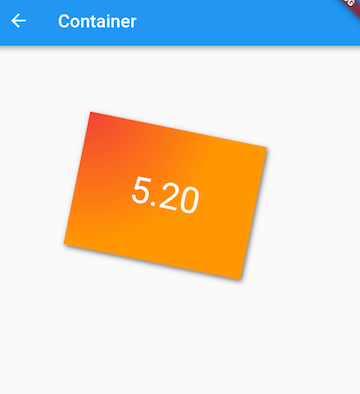
实现代码如下:
1Container(
2  margin: EdgeInsets.only(top: 50.0, left: 120.0),
3  constraints: BoxConstraints.tightFor(width: 200.0, height: 150.0),//卡片大小
4  decoration: BoxDecoration(  //背景装饰
5    gradient: RadialGradient( //背景径向渐变
6      colors: [Colors.red, Colors.orange],
7      center: Alignment.topLeft,
8      radius: .98,
9    ),
10    boxShadow: [
11      //卡片阴影
12      BoxShadow(
13        color: Colors.black54,
14        offset: Offset(2.0, 2.0),
15        blurRadius: 4.0,
16      )
17    ],
18  ),
19  transform: Matrix4.rotationZ(.2),//卡片倾斜变换
20  alignment: Alignment.center, //卡片内文字居中
21  child: Text(
22    //卡片文字
23    "5.20", style: TextStyle(color: Colors.white, fontSize: 40.0),
24  ),
25 )可以看到Container具备多种组件的功能,通过查看Container源码,我们会很容易发现它正是前面我们介绍过的多种组件组合而成。在Flutter中,Container组件也正是组合优先于继承的实例。
Padding和Margin
接下来我们来研究一下Container组件margin和padding属性的区别:
1...
2Container(
3  margin: EdgeInsets.all(20.0), //容器外补白
4  color: Colors.orange,
5  child: Text("Hello world!"),
6),
7Container(
8  padding: EdgeInsets.all(20.0), //容器内补白
9  color: Colors.orange,
10  child: Text("Hello world!"),
11),
12...可以发现,直观的感觉就是margin的留白是在容器外部,而padding的留白是在容器内部,读者需要记住这个差异。事实上,Container内margin和padding都是通过Padding 组件来实现的,上面的示例代码实际上等价于:
1...
2Padding(
3  padding: EdgeInsets.all(20.0),
4  child: DecoratedBox(
5    decoration: BoxDecoration(color: Colors.orange),
6    child: Text("Hello world!"),
7  ),
8),
9DecoratedBox(
10  decoration: BoxDecoration(color: Colors.orange),
11  child: Padding(
12    padding: const EdgeInsets.all(20.0),
13    child: Text("Hello world!"),
14  ),
15),
16...